If you manage an e-commerce store, a wholesale business, or a warehouse database, you have likely faced the checkout mismatch problem. Your online store (like Shopify) says you have 50 items in stock, your physical warehouse count sheet says you have 42, and your distributor’s wholesale catalog says you ordered 60.
Reconciling these numbers manually is one of the most tedious tasks in operations. A single typo, a shifted cell, or a different capitalization format (e.g. SKU-884-RED vs sku-884-red) will break standard lookup formulas and trigger false stock alerts. If you run a multi-channel inventory audit, cross-referencing thousands of product SKUs using linear lookup methods can freeze Excel and lead to billing errors.
Here is an operations manual on why stock mismatches occur, how to audit inventory datasets inside Excel, and how to reconcile multi-channel catalogs securely in your browser.
1. Why Inventory Mismatches and SKU Errors Happen
Inventory discrepancies are rarely the result of simple count errors. In multi-channel commerce, stock record differences are usually caused by system integration gaps and formatting issues:
- Lagging Synchronization Loops: Real-time stock sync loops between your storefront, warehouse management system (WMS), and accounting ledger can drop out. Returns processed in your physical warehouse might take hours to update on Shopify, leading to order mismatch errors.
- Duplicate SKU Codes: Duplicates often creep in during product variant setup. For example, if a shirt is available in different sizes, a creator might assign the same base SKU (
TEE-101) to all sizes rather than unique variant SKUs (TEE-101-SM,TEE-101-MD), throwing off inventory counts. - System Export Glitches: When you export product catalogs as CSV files from different systems, databases handle text fields differently. Some insert invisible spaces, while others strip leading zeros, turning barcode
00918into918. This prevents standard lookup formulas from matching the rows.
The Operational Impact of SKU Errors
When you have missing or mismatched SKUs, your business suffers directly. Missing SKUs lead to “dead capital”—unsold inventory sitting in a warehouse because the system doesn’t know it’s there. Conversely, duplicate or overstated stock counts cause overselling, forcing you to cancel orders and refund customers, which hurts your seller metrics.
2. Reconciling Inventory Inside Excel
When you need to cross-reference your storefront catalog with physical stock counts, Excel has several built-in matching workflows.
Method A: Side-by-Side Cell Validation
If both your Shopify export (Column A) and your warehouse stock sheet (Column C) are sorted in the exact same SKU order, you can calculate inventory count differences directly.
=B2-D2To display a custom label alerting your warehouse manager of discrepancies:
=IF(B2=D2, "Aligned", "Discrepancy: " & (B2-D2))Visual Reference: Inventory Reconciliation Layout
Below is an example of an inventory ledger with count discrepancy highlights:
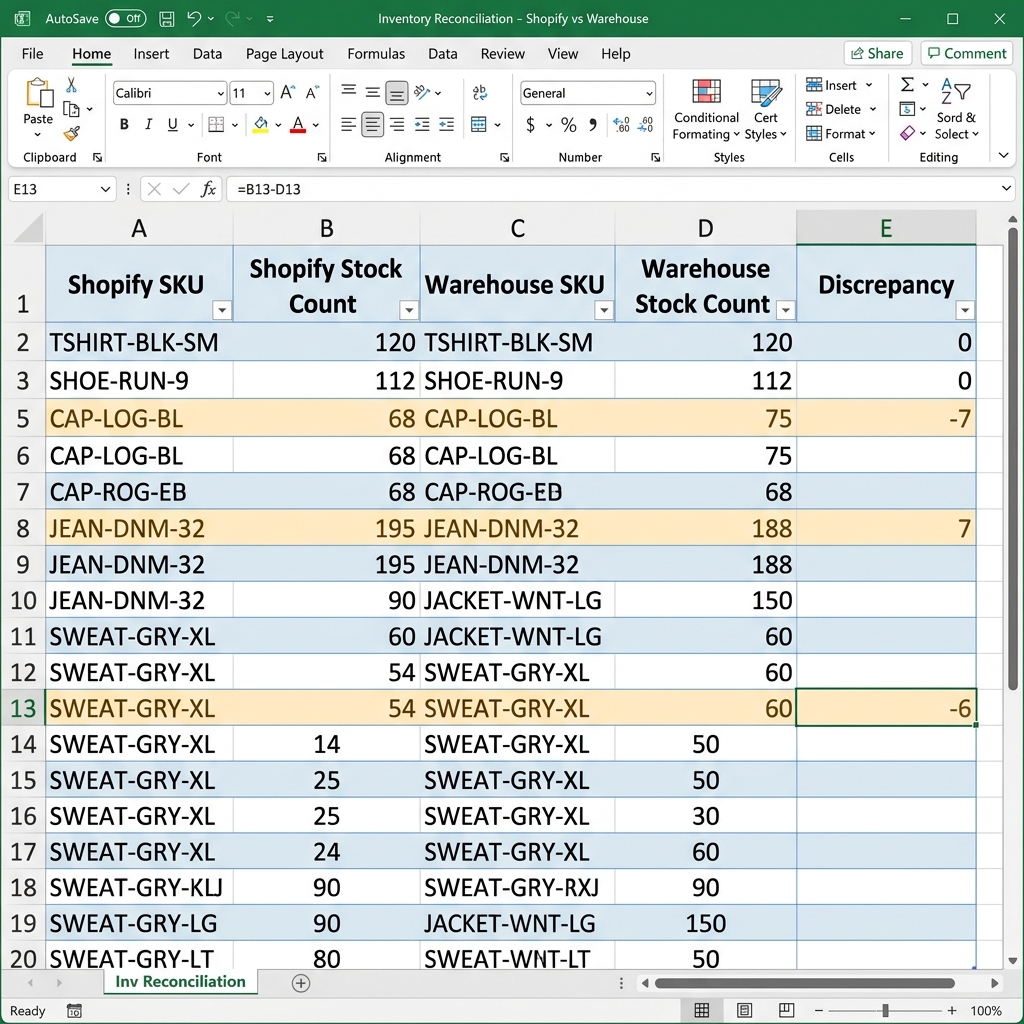 Figure 1: Cross-referencing stock levels between Shopify exports and warehouse counts inside Microsoft Excel.
The Limitations of VLOOKUP in Audits
Most retail tutorials recommend using VLOOKUP to match product lists. However, VLOOKUP has two major drawbacks for inventory audits:
- Strict Directional Locks:
VLOOKUPcan only search columns from left to right. If your SKU column sits to the right of your stock counts, you have to cut and paste columns to align them. - Case Insensitivity:
VLOOKUPtreatssku-black-largeandSKU-BLACK-LARGEas identical. If your warehouse tracking software treats case variations as unique products,VLOOKUPwill return false matches, causing catalog reconciliation errors.
The Modern Alternative: XLOOKUP
If you are running Office 365, use XLOOKUP instead. It allows you to search in any direction and specify default text if a SKU is missing from one of your lists:
=XLOOKUP(A2, $C$2:$C$100, $D$2:$D$100, "Missing SKU")- A2: The Shopify SKU you want to check.
- $C$2:$C$100: The SKU range on your warehouse sheet.
- $D$2:$D$100: The physical count column on your warehouse sheet.
- “Missing SKU”: The default alert text if the SKU is not found in the warehouse database.
If you are using older versions of Excel that do not support XLOOKUP, combining ISNUMBER with MATCH is your best alternative. Refer to our guide on comparing Excel columns without VLOOKUP for step-by-step formula setups.
3. High-Volume Reconciliation via Power Query
For large, recurring inventory audits (e.g. reconciling weekly supplier catalogs with over 50,000 SKUs), writing formulas cell-by-cell is slow and inefficient. Use Excel’s Power Query engine to automate the merge:
- Select your Shopify table, go to the Data tab, and click From Table/Range. This opens the Power Query editor. Rename this query
ShopifyCatalog. - Return to your workbook, select the supplier catalog table, and load it into Power Query. Rename it
SupplierCatalog. - Inside the editor, click Merge Queries > Merge Queries as New.
- In the Merge panel, select
ShopifyCatalogas the top table andSupplierCatalogas the bottom table. Click on theSKUcolumn in both previews to align them. - In the Join Kind dropdown, select Left Anti (rows only in first).
- Click OK. Power Query will output a clean list of SKUs that exist in your Shopify catalog but are missing from the supplier catalog.
- Click Close & Load to return the results to a new worksheet.
For a deeper dive into working with plain-text comma-separated files, check out our guide on comparing CSV files online.
4. Secure, Browser-Based SKU Matching
While Power Query is powerful, setting it up is time-consuming. If you need to quickly check two inventory exports for missing or duplicate items without building complex data models, you can use online comparison tools.
However, this introduces security risks.
   Catalog Data Security Flow

   Cloud-Based Tools:
   [Supplier Catalog Data] ──(Upload to Cloud Server)──> [Third-Party Logs] ──> [Data Exposure Risk]

   Local-First Web Tools (FixData):
   [Supplier Catalog Data] ──(Local Web Worker Hashing)──> [Secure Memory] ──> [Automatic Erasure]
The Risks of Cloud Catalogs Uploads
Distributor price listings and wholesale catalogs often contain sensitive pricing sheets and contract details. Uploading these sheets to public cloud conversion servers is a major data security risk. If a third-party site caches your uploads, your proprietary supplier agreements and pricing margins could be exposed.
The Local-First Solution
To keep your inventory audits secure and private, you can use client-side tools that process your comparison entirely inside your local browser memory.
By running comparison logic locally via JavaScript Web Workers, tools like the FixData Excel Workspace allow you to compare SKU columns from different sheets without uploading files to external servers.
Visual Reference: SKU Difference Auditing
Below is an example of the FixData interface highlighting missing inventory items:
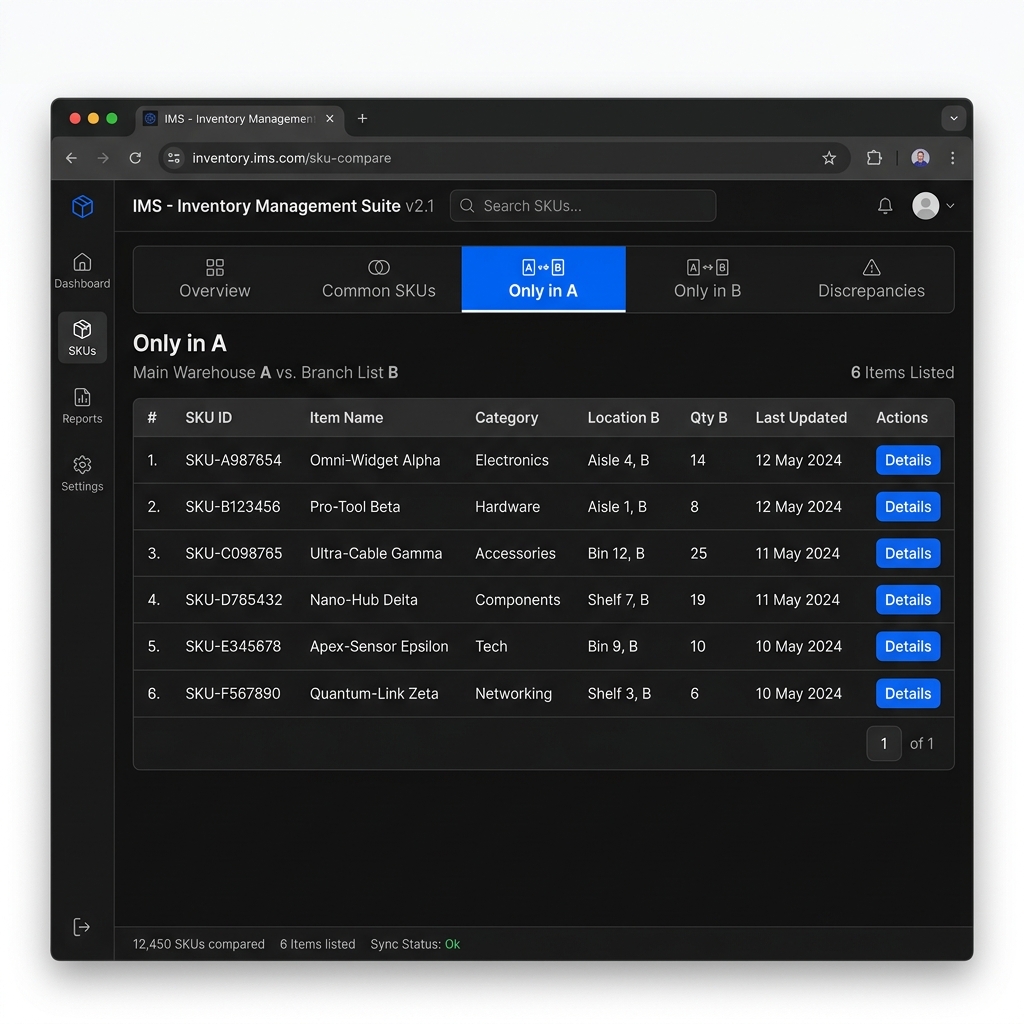 Figure 2: Isolating missing supplier SKUs in the FixData browser workspace.
Reconciling SKU Lists on FixData:
- Open the FixData Workspace.
- Copy your master storefront SKU column and paste it into List A.
- Copy your warehouse SKU column and paste it into List B.
- Inspect the matches and unique items:
- Matches: SKUs present in both systems (your standard catalog).
- Only in A: Products listed on Shopify that are missing from the warehouse records (dead capital or unlogged stock).
- Only in B: Stock present in the warehouse but missing on your storefront (unlisted products).
- If you have duplicate SKUs in a list, use the Auto Deduplicate warning tool. Review our guide on finding and removing duplicates in two lists for more details.
- Click Export CSV to download your resolved lists.
5. Summary Table: Inventory Matching Methods
| Method | Best For | Row-Shift Handling | Case-Sensitive matching | Operational Effort |
|---|---|---|---|---|
| Excel Side-by-Side | Side-by-side ordered stock check | None (Offset breaks page) | Yes (via EXACT) | Low |
| XLOOKUP / MATCH | Labeling mismatches | High | No | Medium |
| Power Query Merge | Repeating large-scale supplier audits | High | No | High |
| FixData (Local-First) | Quick, secure SKU comparisons | High | Yes (Toggleable settings) | Low (Instant paste) |
FAQ Section
Why are my SKU codes returning mismatches when they look identical?
This is usually caused by hidden characters like trailing spaces, different cell formatting, or carriage returns. Ensure you clean your columns using search-and-replace to strip blank spaces, or use the automatic sanitization options on FixData.
How do I match Shopify variant SKUs against base SKUs?
If your Shopify SKUs contain size or color suffixes (e.g. TEE-101-XL) but your distributor uses base SKUs (TEE-101), you can use a helper column in Excel with the formula =LEFT(A2, FIND("-", A2)-1) to strip the variant suffix before running your comparison.
Can Excel reconcile stock quantities while matching SKUs?
Yes. You can use the =SUMIF or =SUMIFS functions to sum up stock levels for matching SKU codes across different sheets, allowing you to compare total quantities regardless of row order.
Author Section
Written by FixData Team
We build privacy-first spreadsheet comparison, data reconciliation, and Excel workflow tools designed to help teams compare, clean, and validate data without uploading files to external servers.